
The first time someone in the house asks why the poster is wrong, you find out the scan was the easy part.
The scanner is right most of the time, and the misses are the ones everybody sees. A film matched to the wrong year. A poster you would not have chosen. A season that arrived as a pile of files the server did not recognise. None of that stops playback. It just makes the server feel like a project you are still apologising for.
I would rather spend the evening on the ten things people notice than on the catalogue. Part one got the server and the first film working. This one is the menu behind a film, the two plugins I would actually install, and the subtitle file that decides whether playback stays quiet.
The three-dot menu
Open any film and press the three dots. The five entries that matter are Edit metadata, Edit images, Edit subtitles, Identify and Refresh metadata, and everything else in that menu can wait.
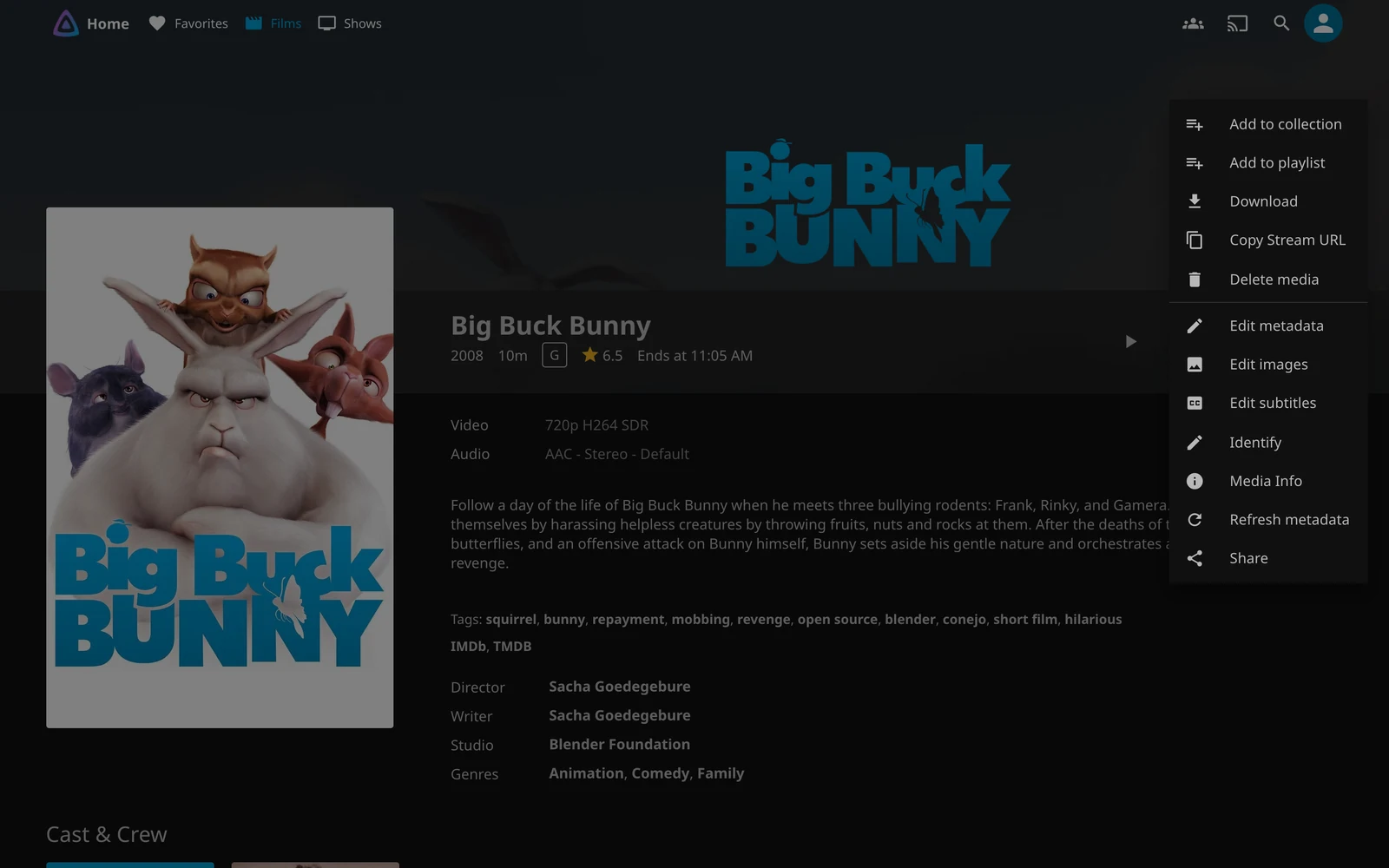
People open the editor and start typing a plot. I do not. Identify is a search. Refresh metadata re-fetches the record from the providers already turned on for that library. Edit metadata is the form, for when the match is right and one field is still wrong. I use them in that order, because typing a synopsis the provider already has is how an evening disappears.
Identify’s own line is better than mine: enter one or more search criteria, and remove criteria if you want more results. The fields are Name, Year, an IMDb id, a TMDb movie id and a TMDb box set id. The path is on the form and you cannot edit it, which is right, because the file is the record and moving the file is how you move it.
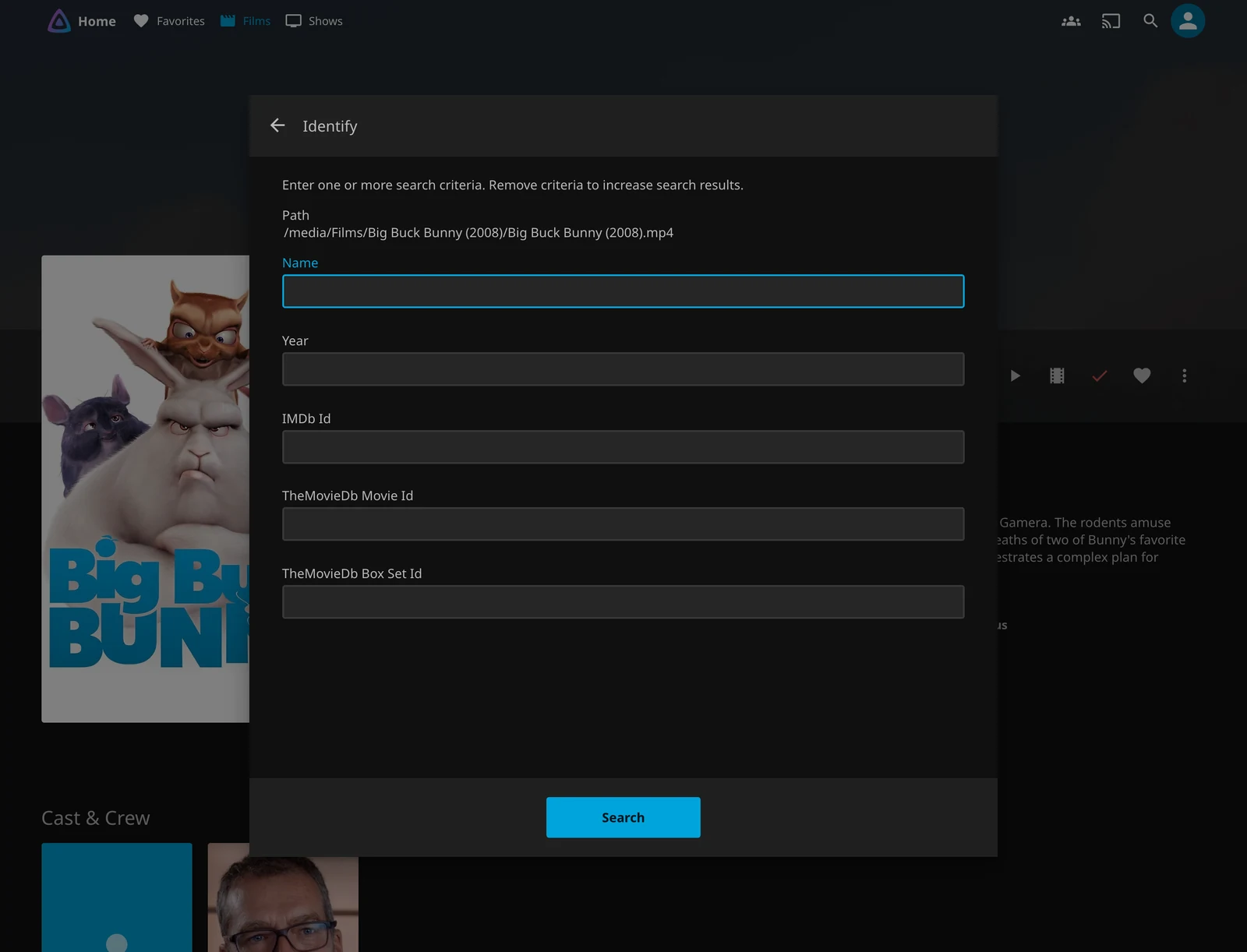
If the name-and-year search comes back empty, take a field out. The dialog says that, and it means it. If you already have the id, skip the search and paste it. I would rather paste an id than argue with a title that exists twice.
Two plugins, then stop
A fresh Jellyfin 12.4 server already has six plugins: TMDb, OMDb and Studio Images for films and television, MusicBrainz, AudioDB and ListenBrainz for music. The catalogue on that same server listed 36 more. I went in for two.
Open Subtitles is the one I would install before anyone asks. It downloads subtitles from OpenSubtitles.com, and it will not download until you put an account on its configuration page. You set the languages per library, and that setting is the whole plugin. Without it you are guessing what it will fetch, and a stream of the wrong language is worse than no subtitles at all.
Subtitle Extract is the other one, and only if the library has a lot of embedded tracks. It pulls those subtitles out before playback, so a client that cannot direct-play them does not sit there while the server extracts them mid-stream. If your files are clean external .srt files already, you do not need it. I would not install it out of tidiness.
The rest of the catalogue is real, and most of it is for a library I do not have. TMDb Box Sets builds collections from TMDb’s own collections. Trakt records what you watched, and Simkl scrobbles films, shows and anime. Fanart scrapes extra posters, which is the one I would come back for if TMDb’s artwork is consistently ugly.
TheTVDB and TVmaze add television metadata when TMDb’s record is the wrong one. Playback Reporting collects watch statistics, and Reports inventories the library, which is useful once. LDAP authenticates against a directory you already run. DLNA adds DLNA playback, which only matters if something in the house still speaks it. None of that is day two.
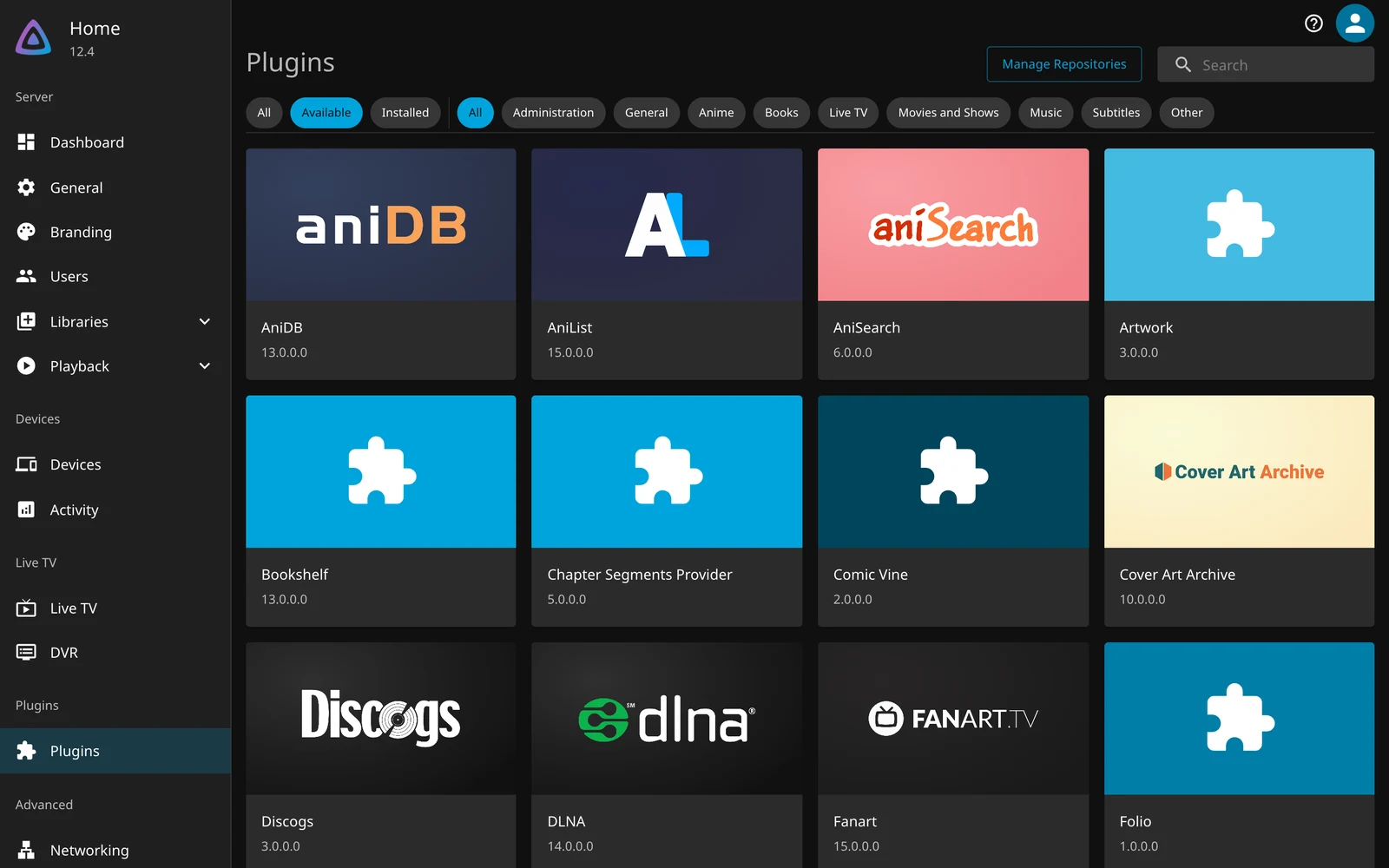
The second surprise is the restart. Installing one is a click, and then the plugin sits in the installed list with a Restart status and does nothing until the server comes back up. Open Subtitles 25.0.0.0 did exactly that on the test server. I install both, then restart once, because doing them one at a time is how you interrupt a film twice.
A plugin is code running inside the server, so I stay in the official catalogue. A third-party repository, which the project lists separately from its own, is someone else’s code with the same reach. I would not add one because a forum post said it was handy.
And I would remove the ones I stopped using, for a boring reason. The 12.0 upgrade notes say to take third-party plugins off before you upgrade: plugins built for 10.11 will not load, and they need new builds from their authors. Official plugins were already updated, and the 12.0 write-up is the longer version of that afternoon. An unused plugin is how an upgrade morning gets longer than it needed to be.
Providers
TMDb does the work. On a movie library it is the first metadata downloader and the first image fetcher, and the help text says lower-priority downloaders only fill in what it left empty. I leave that order alone. The library looks like TMDb, and that is what I want.
OMDb is the second name, and narrower than it looks. The project’s own footnote says the OMDb API only provides English metadata. It is useful for an IMDb rating and for a gap. It is not how you run a library in another language. I would rather find that out before the first thousand films, not after.
The catalogue is where you fill a real gap, not where you tick every box because the page looks bare. TheTVDB and TVmaze supply television metadata when TMDb’s record is the wrong one, Fanart scrapes extra posters from fanart.tv, and Studio Images ships installed and fetches studio artwork. Try one when a title is actually wrong. Enabling the whole list does not make the matches wiser. It makes the next scan longer.
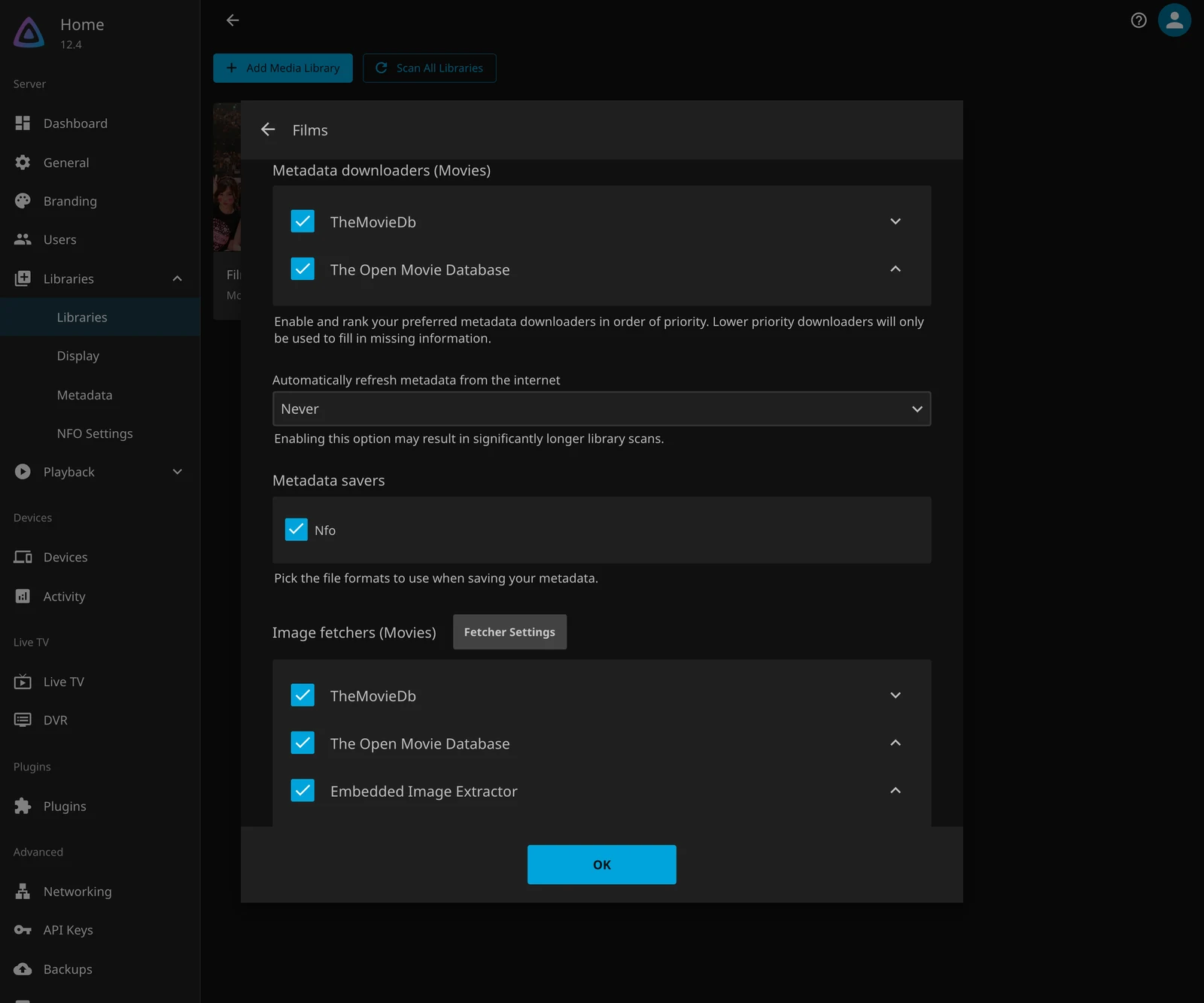
The warning at the top of that dialog is the one I wish I had read the first time. Changing the providers does not rewrite the library you already have. It changes what happens to the next film you add. Existing titles need a refresh, item by item or library by library, and a refresh of a wrong match just fetches the wrong record again, with more confidence. Fix the match first.
A wrong match
The metadata editor is a long form. Most of it you will never touch, and that is fine. The fields that fix a bad display are title, original title, original language, sort title and date added. The path at the top is not editable, same as in Identify.
If the match itself is wrong, do not start there. Open Identify, put the title in Name and the year in Year, and search. If it comes back wrong again after a rescan, stop fighting the form and put a provider id in the folder name. These two are the project’s own examples, not ones I invented to look tidy:
Film (2010) [imdbid-tt0106145]
Film (2018) [tmdbid-65567]
Square brackets, parentheses or curly braces all work. The same page documents TMDb, IMDb and TVDB identifiers, and the short aliases tmdb-, imdb- and tvdb-. A hand edit is a record the next scan can argue with. A provider id is an instruction, and I trust the instruction.
People who came from Kodi hit a separate trap, and it is an annoying one. If the folder contains a .nfo file, Jellyfin reads it and gives it priority over TMDb and the other remote providers. The project says it is currently not possible to disable that.
Useful if the file is yours and you meant it. A nuisance if you forgot it was there, because every refresh keeps agreeing with the old file instead of the provider. Look in the folder before you blame the scanner. I would, every time.
Two copies of the same film are the other folder problem, and the fix is fussier than it should be. Jellyfin treats them as one title only when each file begins with the folder name, exactly, including the year and any provider id, and then a version label. The label is separated by a hyphen, a dot, an underscore, or square brackets. Spaces around the separator are optional. The movies page’s own example still uses a space, a hyphen and a space, which is the form I would copy:
Movie (2021) [imdbid-tt12801262]/
├── Movie (2021) [imdbid-tt12801262] - 1080p.mp4
└── Movie (2021) [imdbid-tt12801262] - Directors Cut.mp4
If the names do not match that prefix, the files stay separate films. Rename them. It is faster than hoping a menu will sort it out.
Posters
A wrong poster will not stop the film. It is just the thing everyone sees first, which is why I will spend five minutes on it and not an evening.
Open Edit images and you get the types the server actually stores: logo, primary, thumb and backdrops. Each one has a search, an upload and a delete. Search uses the image fetchers enabled for that library, so Fanart only shows up here if you installed it. I would not install it until I had seen ten posters I disliked.
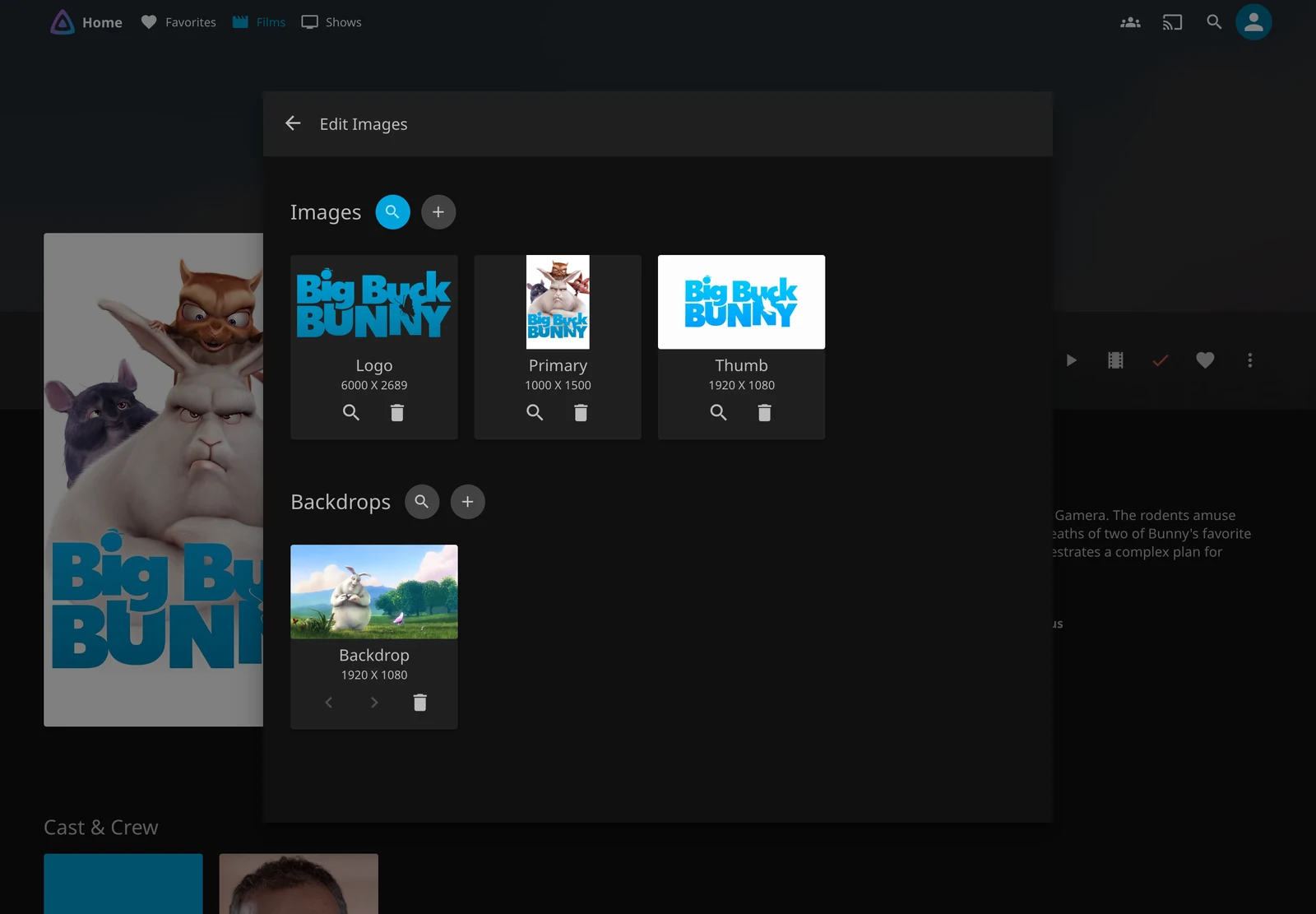
On the test library, Big Buck Bunny came back with the title across the rabbit, and that one is fine. TMDb’s first choice is not always the one I would hang in the hallway, and you find the bad ones by searching, not by hoping the default was tasteful. I would fix the ten worst and leave the rest. A long library always has ugly artwork in the tail. Chasing all of it is a hobby, and I do not have that hobby.
Subtitles
Put the subtitle file next to the video and name it after the film. The movies page uses a language suffix, with flags as extra pieces separated by dots:
Film.en.srt
Film.en.sdh.srt
Film.forced.en.srt
en is the language. sdh, or cc, is the hearing-impaired track, and forced is the track for the foreign lines only. Then there is the trap I would not have guessed. hi by itself is Hindi, not hearing-impaired, and the page warns about that collision because it saves an evening. title.en.hi.srt is the hearing-impaired form. Get it backwards and you have downloaded the wrong track with complete confidence.
Open Subtitles is for the films that arrived without a file. Account on the configuration page, languages per library, then leave it alone. I would rather set the languages once than explain a Portuguese subtitle on an English film.
The ugly failure is not a missing line. It is a transcode. If the client cannot take the subtitle as it is, Jellyfin either converts it or burns it into the picture. The codec page calls the burn the most intensive kind of transcode, because it applies the subtitle layer and re-encodes the video at the same time.
VobSub and PGS are listed there as picture formats, not text, and that is the case I watch for. If a film stutters only when the subtitles come on, this is why, and it is not superstition. Part three is the machine doing that work. This part is knowing the sentence is real.
Subtitle Extract is the plugin for people who would rather not think about it again. The project describes it as extracting embedded subtitles ahead of time, so a client that cannot direct-play them does not wait on the server mid-stream. I think it is worth installing on a library full of embedded tracks. I would not install it on a library of external .srt files, because there is nothing for it to do.
What I change
Most of the library dialog can stay as it arrived. I touch a few of them, and I leave the rest alone on purpose.
Preferred download language is set per library, and if the household is not English-first I would set it when the library is created. The same dialog warns that metadata and artwork changes apply to new content only, so a later change means a manual refresh. I would rather get it right at the start than refresh a library on a weeknight.
Automatic metadata refresh offers Never, every 30 days, every 60 and every 90. The dialog warns that turning it on can make library scans significantly longer. A library that changes twice a year does not need a quarterly refresh. I leave it on Never, and I refresh the film that is actually wrong.
Chapter images are the thumbnails on the seek bar. The chapter-images page is careful to separate them from chapters themselves, which still show up as ticks when the images are off. Extracting the images can slow a library scan, especially a large one. On a small disk I leave them off, because I would rather spend the space on another film than on a prettier scrub bar.
The NFO saver writes .nfo files back out, and that is what makes a library portable to Kodi. I leave it off unless I want those files. Reading is not a switch: local .nfo files are always fetched, and they win over TMDb. Most people do not need the saver. The people who do need it badly, and they already know.
Save subtitles into media folders was already on for the test library. The dialog’s own line is the reason I leave it: storing them next to the video makes them easier to manage. I agree with the dialog, which does not happen often.
Where I stop
The library will not get finished. There will be a wrong year, a missing episode, a poster a provider changed its mind about. I fix what the household sees, and I leave the tail alone. That is a habit, not a cleanup you schedule.
Metadata and subtitles make the library feel owned. They do not make every screen play the file as it sits on disk, because that is codecs, bitrates, and whatever machine is doing the conversion. That is the next part, and it is the one with a hardware bill.
Sources: plugins, Open Subtitles, metadata, identifiers, local .nfo metadata, chapter images, movies, codec support and the 12.0 release post. The screenshots come from the same throwaway Jellyfin 12.4 instance as part one. The test library is eight open films. No household library was touched.