
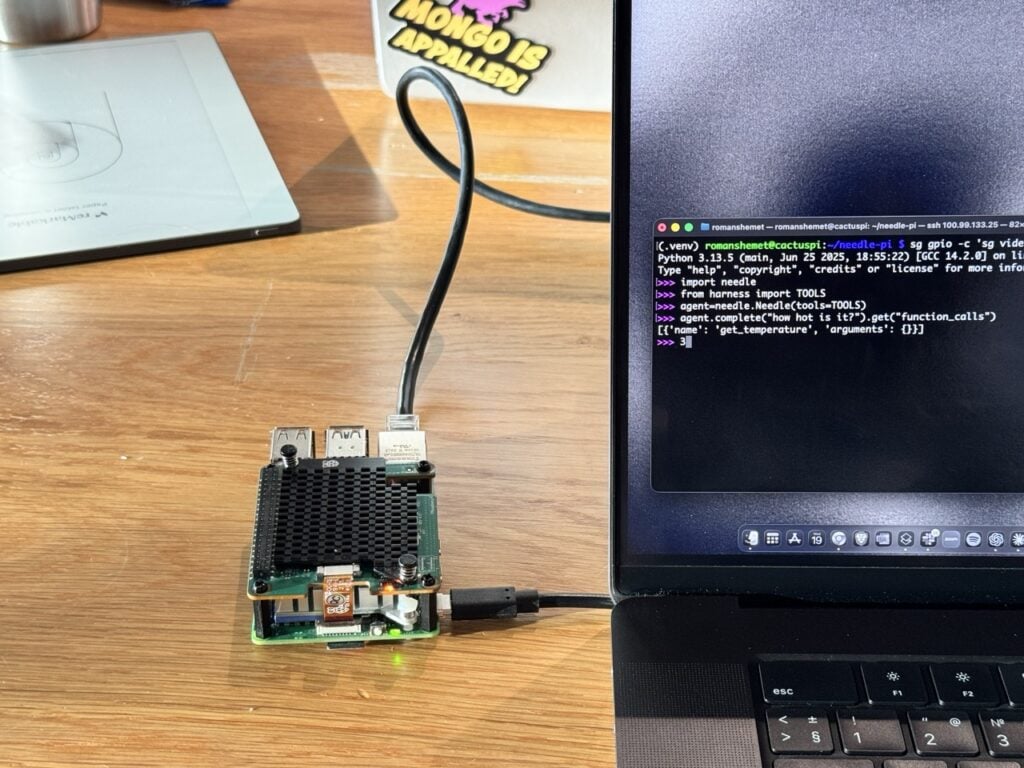
Raspberry Pi published a walkthrough today that shows the current shape of small models nicely: Needle 2, a 14 MB function-calling model, running on a Raspberry Pi 5’s CPU alone. No AI HAT, no cloud API, no network in the loop after the model is downloaded. Type “Turn the LED on” into a session on the Pi, and 78 milliseconds later the LED is on. That timing is the demo’s own measurement, so treat it as the order of magnitude rather than a benchmark. The point is that nothing here feels like a round trip.
What Needle is
Not a chatbot: the project says so itself, and the design agrees. Needle does one job: given the functions your program exposes, it picks the right one and fills in the arguments from what the user said, as JSON. You declare ordinary Python functions; a tool decorator reads their names, docstrings and type annotations to build the schema; the model turns “how hot is it?” into a call to the function that reads the temperature. Cactus’s bet is that tool calling is really matching and assembly (pick the function, extract the arguments), not reasoning, and that a small model is enough for it. Small here means 45 million parameters, shipped as a 14 MB binary, with a session occupying 28 MB of RAM.
Why a Pi cares
The Pi 5 is already the machine many homes use to run the house: it watches the sensors, controls the lights, answers over SSH. A local intent parser is the piece that lets it respond to “turn the LED on” without a subscription, an API key, or a round trip to somebody else’s datacenter, and the ask costs 78 milliseconds of the same CPU that runs everything else. Caveats, honestly: the demo runs on Needle 2, while Cactus’s current release is Needle 3, an 8–29 MB model out since 1 September with the same pitch for even smaller targets. Models this size are fickle outside their training distribution, and the project’s own advice is to test yours, then fine-tune if needed. And “function calling” really is the whole feature: it will not hold a conversation.
My read
That a tiny model runs on a Pi is not news; what it is for, this time, is. Tool calling is the part of the assistant stack that has quietly matured into something you can run on hardware you already own, offline, in a process smaller than a photo. The demo is four lines of Python and an LED: small, unglamorous, and exactly the shape of “I asked the house for something and the house did it.”
Sources: Raspberry Pi’s walkthrough and the Needle repository