

A film stutters, and the first thing you want to buy is a graphics card. I would wait one evening and read the dashboard first.
Jellyfin’s own documentation says transcoding of local sources is always requested by the client. The client sends a profile of what it can play, the server picks the best stream inside those limits, and there is no way to override the output resolution from the server side. That sentence is the whole argument. A transcode is not the server failing. It is the server answering a question the client asked.
This is the third part of the series. Part one got the server running, and part two made the library look right. This one is about the moment playback stops being free, and how to find out whether the fix is a setting, a file, or actual hardware.
Four kinds of playback
The project lists four types, ordered by load. Three of them involve some conversion.
| Type | What it changes | Cost |
|---|---|---|
| Direct Play | Nothing | Almost none |
| Remux | The container | Cheap |
| Direct Stream | The audio | Cheap |
| Transcode | The video | The expensive one |
The dashboard names the type per stream. Before you price a GPU, read that name. If it says Direct Play and the film still stutters, the problem is the network, the disk, or the client, and a graphics card will not fix any of them.
That last case is worth saying out loud, because it is the one people misdiagnose. Direct Play means the server is sending the file as it sits on disk. If that stutters, the server is not working hard. Something between the disk and the screen is.
The dashboard tells you why
Open the dashboard while something is playing and look at the session. The playback info shows the method, the codecs, the bitrate, and, when it is transcoding, a set of reasons. Those reasons are more useful than the word “transcode”.
The common ones are video codec not supported, container not supported, audio codec not supported, and bitrate above the client’s limit. Each points somewhere different. A codec reason says the client cannot decode what is in the file. A container reason says it can decode the streams but not open the box. An audio reason is usually the cheapest to fix, because audio transcodes cost very little.
I would read the reason before touching a setting. It is the difference between changing a client, changing a file, and changing the server.
Remote streaming adds a bitrate limit that has nothing to do with codecs. The client asks for a maximum bitrate, and a file above it gets transcoded even when the client could decode it. That is the usual reason a film that direct plays on the living room television transcodes on a phone over mobile data. Part four is about getting the server out of the house; this is the one part of that problem that belongs here.
I tested five files
The test server is the same throwaway Jellyfin 12.4 container from the first two parts. It has no GPU, so everything here is software transcoding. I added five test files and asked the server the same question twice, with two different client profiles.
The first profile is a deliberately limited television: H.264 and AAC in MP4 only. The second is a current client that handles HEVC, AV1 and FLAC. Same server, same files, same library.
| Test file | Limited profile | Current profile |
|---|---|---|
| H.264 1080p, AAC | Direct Play | Direct Play |
| HEVC 10-bit 1080p, AAC | Transcode, video codec | Direct Play |
| AV1 10-bit 1080p, AAC | Transcode, video codec | Direct Play |
| HEVC 10-bit HDR 4K, AAC | Transcode, video codec and bitrate | Direct Play |
| H.264 1080p, FLAC 5.1 in MKV | Transcode, container and audio | Direct Play |
Four of the five flipped. The server did not get faster between the two runs. The client stopped asking for a conversion.
One transcode is not a crisis, either. A modern CPU can usually carry a single 1080p stream and still serve the rest of the house. The question is whether it keeps up, not whether the dashboard uses the word. If the film is smooth and the CPU has headroom, the transcode is doing its job. I would only start measuring when it cannot.
That is the part I would put on a note above the desk. The oldest screen in the house sets the requirement, not the newest phone. If one television is the only thing that cannot play the library, the cheap fix is often that television’s client, not the server’s CPU.
How to test your own house: play the worst file you own on the oldest screen you own, open the dashboard, and write down the method and the reason. Do that for each distinct device. It takes twenty minutes and answers the hardware question better than any spec sheet, because it is the only test that uses your files and your clients. I would do it before reading another benchmark.
What makes a file hard
HEVC 10-bit is the first thing to check. It is the sensible codec for storing 4K, and plenty of clients still cannot decode it. The Media Info dialog shows the codec, the profile and the bit depth. Main 10 and 10 bit are the lines I look for.
AV1 is the other one. Browsers handle it well now. Televisions and older boxes are years behind. A file that direct plays in Chrome can transcode on the TV in the other room, and both are correct.
H.264 10-bit is a trap with a specific shape. Intel, NVIDIA and AMD do not hardware decode it. The project’s own hardware page says only Apple Silicon and Rockchip support it.
It also says Jellyfin falls back to software decoding when there is no hardware decoder. If a file is 10-bit H.264, the fix is to re-encode it to HEVC 10-bit, not to buy a card that still cannot decode it.
The container matters less than people think. Remuxing is cheap. A file that only needs a new container is not the reason to upgrade a server.
Audio is where the cheap wins live. DTS and TrueHD are the ones that trip a television perfectly happy with AAC. FLAC is broadly supported, but the client still has to declare it. An audio transcode costs a fraction of a video transcode, and it is often the only thing happening.
Subtitles are the exception that behaves like video. If the client cannot render the subtitle track, Jellyfin can burn it into the picture, and the codec page calls that the most intensive kind of transcode. VobSub and PGS are picture formats. If a film stutters only when subtitles are on, this is why.
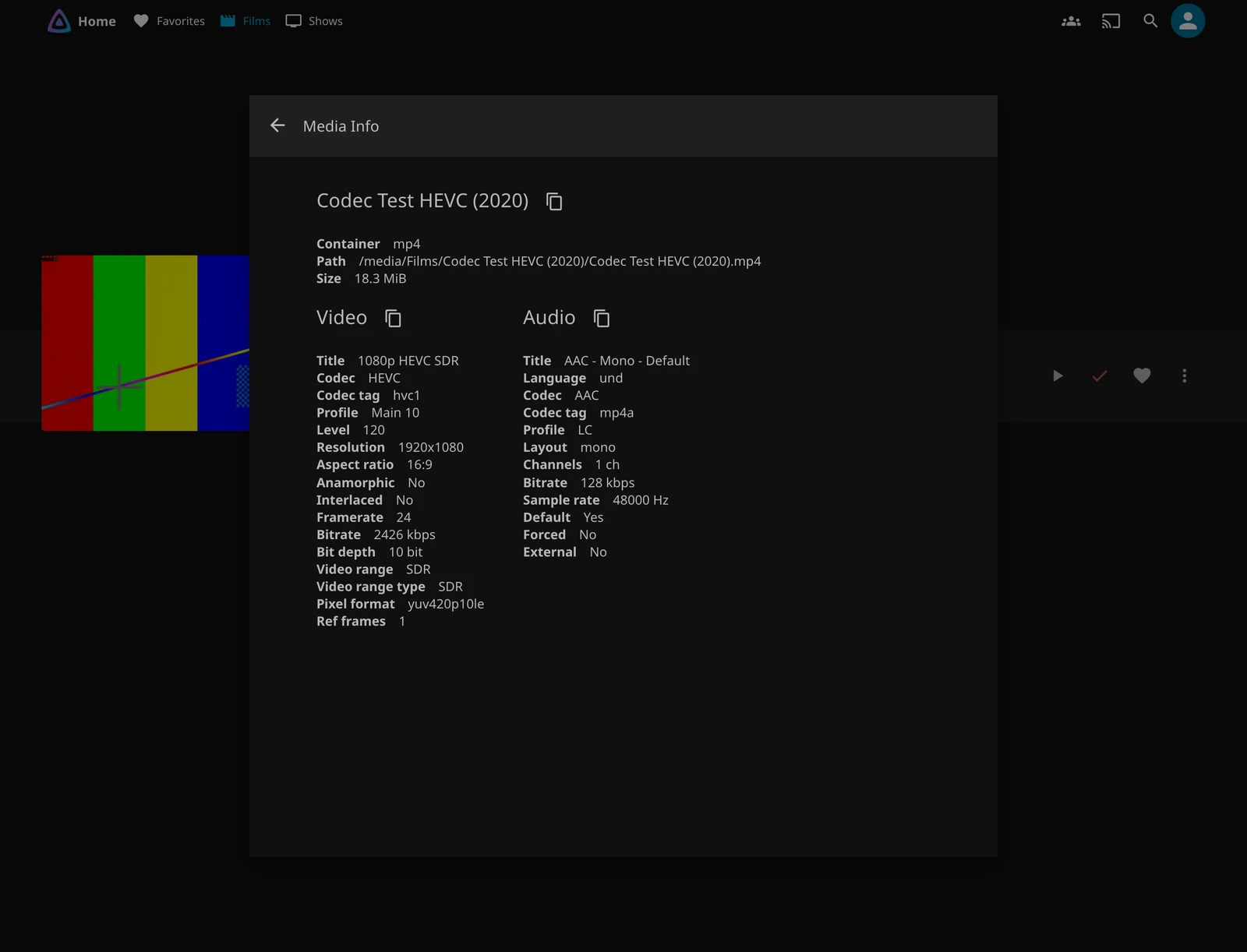
You can read the same three lines without opening Jellyfin, which is faster when you are looking at a folder of files rather than a library:
ffprobe -v error -select_streams v:0 \
  -show_entries stream=codec_name,profile,pix_fmt,width,height \
  -of default=nw=1 "film.mkv"
pix_fmt ending in 10le is the 10-bit tell. codec_name=hevc with profile=Main 10 is the file a lot of older clients will refuse. That is the moment to check the client, not the CPU.
When it really is the hardware
There is one case where I would stop measuring and spend money: HDR.
When an HDR film plays on an SDR screen, Jellyfin has to tone-map it during the transcode. The project says this can be done in software, that it is very slow, and that no modern consumer CPU may be able to do it in real time. It also says a basic Intel iGPU can handle as much of that load as a Ryzen 5800X. That is not a close call. If the library has 4K HDR films and the household has SDR televisions, the GPU is the answer.
The second case is concurrency. One 1080p transcode is manageable on a decent CPU. Three 4K streams at once is not. If the house regularly has several people watching different things, the CPU budget stops being theoretical.
Everything else is a client or a file problem wearing a hardware costume.
What to buy, in order
Intel integrated graphics come first. It is the default recommendation for a reason: drivers are in the Linux kernel, QSV is well supported, and there is no concurrent encoding session limit. Seventh-generation Core and newer decode and encode HEVC 10-bit. Eleventh-generation and newer decode AV1, and ARC cards can encode it. The project’s own guide calls the entry-level UHD 600 family adequate for personal use, and the mainstream UHD 620 and 630 capable of several 4K HDR HEVC streams at once.
Avoid Intel CPUs ending in F. They have no integrated GPU.
If you own a seventh-to-tenth-generation Intel CPU already, the project says to keep using it. The toolkit for those generations is deprecated, but the hardware still does the job. That advice is about a purchase decision, not a reason to replace a working server.
Apple Silicon is the pick if the server is a Mac. VideoToolbox is the only method on macOS, and the project says an entry-level M1 can transcode three 4K 24fps Dolby Vision HEVC streams at once with tone-mapping, using the speed preset. The M3 decodes AV1, but ffmpeg does not support that decode path yet, so do not buy on that line alone.
NVIDIA is the pick if you already own one. Pascal and newer encode HEVC 10-bit, Ampere and newer decode AV1, Ada and newer encode AV1. The low-end cards are the trap: a GT 1030 or MX450 has no encoder. NVENC also has a concurrent session limit, unlike Intel and AMD.
AMD is the last choice, and the project says so. Its H.264 encoder has been the weak one, and most clients still ask for H.264. Newer cards improve HEVC and AV1, but the guide still ranks AMD behind Intel and NVIDIA. The RX 6400 and RX 6500 have no encoder at all.
A Raspberry Pi is not a transcoding server. The project has deprecated hardware acceleration on the Pi, and the Pi 5 removed the hardware encoders entirely. It is a fine Direct Play box. It is not the machine to buy for a household of mixed clients.
On encoder quality, the project’s ranking is blunt: NVIDIA’s newest cards at the top, then Intel Arc, then Apple, then Intel, then NVIDIA’s older generations, then AMD. Most of that only matters if you care about the picture at a low bitrate. For a household streaming on the local network, almost any supported encoder is fine.
If you already have a GPU in another machine, rffmpeg can delegate transcoding over SSH. That is a power-user route, and it needs shared storage. I would not start there.
Turning it on
The setting is under Dashboard, Playback, Transcoding, in the Hardware acceleration dropdown. On the test server it says None, and that is honest: the container has no GPU to pass through.
That is also the first mistake. The checkbox alone does nothing. The container has to see the device:
devices:
  - /dev/dri/renderD128:/dev/dri/renderD128
group_add:
  - '122'  # getent group render | cut -d: -f3
The group id is the host’s render group, which is not always 122. Get it with getent group render. NVIDIA needs its container runtime instead, and the project documents that separately.
Then pick only the codecs the GPU actually supports. Enabling everything is how a driver falls back to software and gets blamed for being slow. Leave the thread count on Auto. Leave the tone-mapping algorithm on the default BT.2390 unless you have a reason.
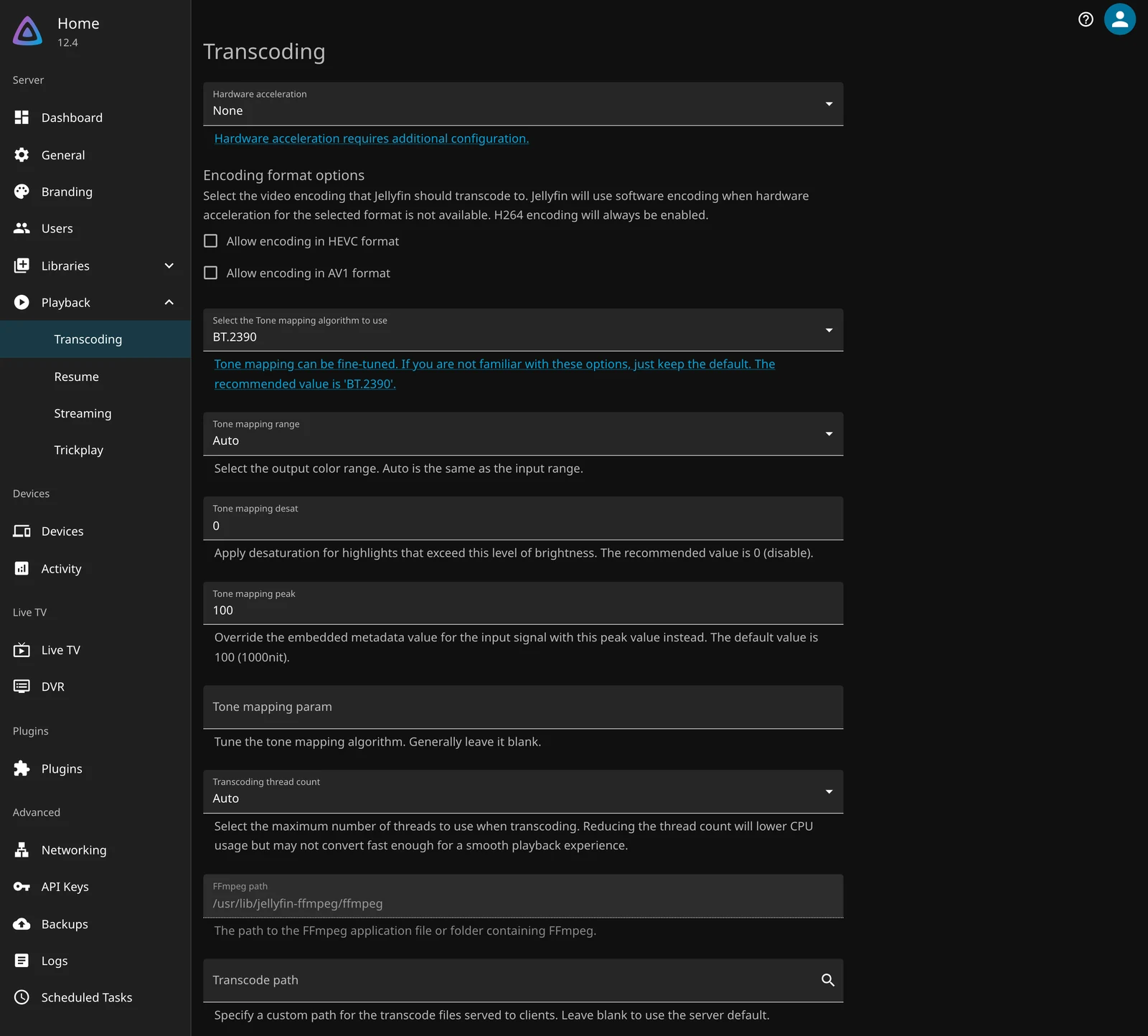
To verify it, play a file that has to transcode and watch the ffmpeg process. If hardware acceleration is working, CPU use drops and the GPU engine is busy. On Linux, nvidia-smi shows the NVIDIA engines directly. AMD is the awkward one: the project says there is no reliable way to read the video engine’s occupancy, so radeontop is an indirect look at the GPU’s other engines, not a direct check.
On a Mac, the project says ffmpeg should not be using a few hundred percent CPU; the GPU percentage may stay near zero because the work happens on the media engine.
If the dashboard still says None after you enabled it, the container cannot see the device. That is a Docker problem, not a Jellyfin problem, and no amount of reinstalling the server will fix it.
What I would do
If I were building a new server, I would buy an Intel CPU with integrated graphics, 8 GB of RAM, and an SSD for the config and cache. That covers HEVC 10-bit, tone-mapping, and several streams without a discrete card. I would not add a GPU until a real file on a real screen said I had to.
If the server already exists, I would test the worst file on the worst client before spending anything. The table above is the reason. Most of the time the server is fine, and the client is old.
If one television is the only problem, I would price a streaming stick or a newer box before a graphics card. It is usually cheaper, and it fixes the actual constraint.
If the library is 4K HDR and the screens are not, I would buy the GPU. That is the case the hardware is for.
The hardware bill is real. It is just smaller than the shopping list, and it arrives later than the first stutter.
Sources: transcoding, hardware acceleration, the Intel, AMD, NVIDIA and Apple guides, hardware selection and codec support. The five test files were generated with ffmpeg and played through the throwaway Jellyfin 12.4 container. The client-profile results came from the server’s own PlaybackInfo endpoint. No GPU was passed through, so every transcode in this piece is software.